
PPSSPP - PSP emulator
Henrik RydgårdAction
4.430.19K Reviews
- Version
- v1.20.4
- Installs
- 100.00M
- Age Rating
- Everyone
Screenshots
Our Review of PPSSPP - PSP emulator
 Analysis by Appyee
I like PPSSPP - PSP emulator most as a way to make a game collection you already own portable again, not as a shortcut to getting games. It is a free Android action emulator from Henrik Rydgård, and its appeal is simple: it lets a phone take the place of a PSP for compatible games. The difference between a convenient pocket-sized revisit and a frustrating setup depends less on the app itself than on having game files you can use and a device that suits the titles you want to play.
What you need before the first game
The first practical question is where the games come from. The emulator does not arrive with a library ready to play; you need compatible game files separately. I’d treat that as the first decision, before changing graphics settings or connecting a controller. If you already have games and know how to make usable copies, getting started makes sense. If you are expecting a catalog built into the app, this is not that kind of service.
That distinction also matters for legality and convenience. I recommend using files from games you own and checking the rules that apply where you live. Be cautious about random download sites: beyond the legal concerns, files from unknown sources can be unreliable. The emulator is a player for your own setup, rather than a storefront that solves the sourcing question for you.
A practical fit for short sessions and familiar games
A realistic use case is a commute or a quiet break: I can keep a game available on my Android device and play a section without bringing a separate handheld. The phone is especially convenient for turn-based or slower-paced games, where touch controls are less demanding. Fast action games can also be enjoyable, but the small virtual buttons take up screen space and may feel less precise than physical controls.
For a longer session at home, a Bluetooth controller can make the phone feel closer to a dedicated handheld. I would check that the controller connects properly and that the game responds as expected before settling in for a difficult boss fight. Touch controls are adjustable, which helps you move buttons away from awkward spots, but customization cannot make every screen size or game layout equally comfortable.
This is a better choice for someone who values flexibility and already has a PSP library than for someone who wants the simplest possible plug-and-play experience. A current mobile game usually opens directly into its own content, while this emulator asks you to manage game files and settings. A physical PSP, where available and working, avoids the emulator setup and offers the original handheld controls; PPSSPP is more appealing when using a phone is the bigger convenience.
Playing PSP games on a phone
These days, retro gaming has become a bit of a craze, and if you’re anything like me, you’ve probably felt a tug at your nostalgia strings. Enter the PPSSPP - PSP emulator, an app that lets you revisit those classic PSP games right on your smartphone. If you’ve ever longed to play "God of War" or "Final Fantasy" on your mobile, this app is your new best friend.
Getting Started with PPSSPP
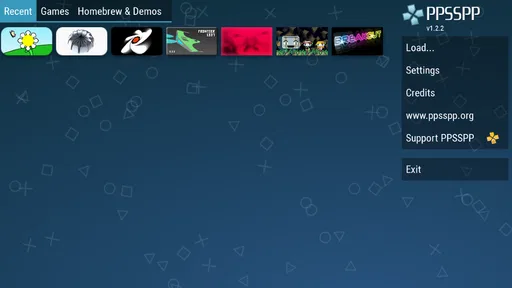
First things first, downloading and setting up the PPSSPP - PSP emulator is a breeze. You can snag it from either the Play Store or the App Store, depending on your device. Once you’ve got it installed, you’ll notice the user interface is super intuitive. The layout is clean, and even if you’re not tech-savvy, you’ll find it easy to navigate.
Now, one thing to note is that the emulator doesn’t come with games pre-loaded. You’ll need to grab the ISO files for the games you want to play. A quick search on Google, and you’ll find plenty of resources. Remember to keep it legal and only download games you own!
Performance and Features
Okay, let’s talk about performance. The emulation quality is where this app truly shines. I was blown away by how smoothly it runs even the most graphically demanding PSP titles. The developers have done a stellar job ensuring that the games look crisp and vibrant on a smaller screen.
One of the coolest features is the ability to upscale textures. This means that games can look even better than they did on the original PSP. You can also adjust the rendering resolution, which is a godsend for high-end devices.
And let’s not forget about the controls. The app offers full customization, so you can tweak on-screen buttons to your heart’s content. If you’re like me and prefer physical buttons, you can easily connect a Bluetooth controller and elevate your gaming experience.
Compatibility and Usability
I’ve tried a slew of games on the PPSSPP, and I have to say, compatibility is pretty impressive. Most titles run without a hitch. However, there might be a few niche games that struggle, but hey, nothing’s perfect, right?
The emulator is regularly updated, which is a big plus. It means any bugs or issues are swiftly addressed, keeping the app working smoothly. The community behind it is active and passionate, always contributing to its improvement.
Small adjustments that make a real difference
One useful habit is to test a game at its default settings before trying to improve its appearance. If it already runs comfortably, there may be no reason to increase rendering resolution; a sharper image is not worth much if it makes play less smooth on your device. I’d change one option at a time, then revisit the same scene. That makes it easier to tell whether an adjustment helped or merely changed the look.
Save states are valuable when you have only a few minutes, since they let you pause at a useful point rather than rely solely on a game’s own save system. I still wouldn’t use them as my only progress record: keeping a normal in-game save as well is a sensible safeguard, especially before experimenting with settings or cheats. Treat save states as a convenience, not a replacement for understanding how a particular game saves.
Cheat support is another tool best used deliberately. It can help when you are stuck or want to explore a game differently, but using cheats can also remove the challenge you may have wanted to revisit. I’d keep a separate save before trying them, so a quick experiment does not spoil a longer playthrough.
Customization Galore
One thing that stands out with PPSSPP is its level of customization. You can dive into the settings and tweak everything from the audio and graphics to the controls. Want to add some shaders for that extra visual flair? Go for it. Want to save your game at any point? The save state feature has got you covered.
For the tech enthusiasts out there, the app also supports cheat codes. So, if you’re in the mood to spice things up or breeze through a tough level, you’ve got that option too.
Fairness, cost, and the trade-offs
The app is free, so trying the emulator does not require an upfront purchase. That does not mean every part of using it is effortless: you still need game files, and getting the controls and graphics comfortable can take some tinkering. I see the main trade-off as time and setup rather than a pay-to-win system. The experience is about running games you provide, not competing in a built-in economy.
That makes fairness a different question from the one I’d ask about a typical action game. There are no in-app competitions or progression systems described here to assess for paid advantages. In practice, your experience depends on the game, your device, and whether you choose to use supported cheats. If you want an untouched challenge, simply avoid cheats and use your game’s regular saves; if accessibility or experimentation matters more, the option is there.
Compatibility, device expectations, and who should skip it
The Android release is rated for Everyone, has an average rating of 4.4 from around 1.8 million ratings, and has passed over 100 million installs. Those figures suggest broad interest, but they cannot promise that every game will behave the same way on every phone. The current Android version is v1.20.4, and the minimum operating system is Android 5.0. I would still judge suitability by the games you care about and how comfortable your device feels during a real session.
For a first test, choose one game you know well rather than loading a large collection and changing several options at once. Check whether the game launches, whether the sound and controls feel right, and whether performance remains comfortable in a demanding scene. If you run into trouble, return graphics options to a simpler setting before assuming the game is incompatible. This modest test can save a lot of time and makes it easier to identify the source of a problem.
I would skip this if you do not want to manage files, prefer a game to work immediately, or strongly dislike touch controls and have no controller to use. It is also not a replacement for a game collection: the emulator does not supply the PSP titles themselves. If your priority is a single, polished mobile game with built-in content and no configuration, a native mobile release is the more straightforward choice.
Trust and my final take
Henrik Rydgård is the developer, and the game has been available since November 10, 2012. Its long-running presence and active community are encouraging, but I would not treat popularity as a guarantee that every title will run perfectly or that every settings combination is ideal. As with any emulator, it is worth keeping expectations specific: this is a way to play compatible PSP games on Android, with extra flexibility, not a promise that every old game will feel exactly like dedicated hardware.
Overall, I recommend it to people who already have a legitimate route to their PSP games and are happy to tailor the experience. Its strongest practical advantages are portability, adjustable controls, visual options, and save states. Its real costs are the setup effort and the occasional need to troubleshoot a particular game or device. If those trade-offs sound fair, it is a compelling way to revisit a portable library; if not, original hardware or a native mobile game will likely be less work.
In a nutshell, the PPSSPP - PSP emulator is a must-have if you’re a fan of PSP games. It’s incredibly versatile, user-friendly, and it brings those beloved titles to life on your mobile device. Whether you’re reliving your childhood or discovering PSP classics for the first time, this emulator is a fantastic way to do it.
So, if you haven’t already, give it a whirl. Trust me, you won’t regret diving into the world of PSP gaming once more. Just remember to grab your favorite snacks, because you might find yourself glued to your screen for hours!
Verdict
Strengths of PPSSPP - PSP emulator
- High compatibility with PSP games.
- Customizable control options.
- Supports HD resolution enhancements.
- Frequent updates and bug fixes.
- Free with optional paid version.
Limitations of PPSSPP - PSP emulator
- May require powerful device.
- Occasional performance issues.
- Some games need manual settings.
- Ads in free version can be intrusive.
- Limited online multiplayer support.
Other Releases by Henrik Rydgård
View All
PPSSPP Gold - PSP emulator
Action4.5
Similar Picks in This Category
View All
Temple Run 2: Endless Escape
Imangi Studios4.1

PUBG MOBILE
Level Infinite4.3

Free Fire: 9th Anniversary
GARENA INTERNATIONAL I4.4

Talking Tom: Hero Dash Run
Outfit7 Limited4.3

slither.io
Lowtech Studios3.9

Sniper 3D:Gun Shooting Games
Wildlife Studios4.6
Frequently Asked Questions
What is PPSSPP and how does it work?
PPSSPP is a popular emulator designed to run PSP games on Android and iOS devices. It replicates the PSP environment, allowing users to play their favorite PSP games directly on their smartphones or tablets. The emulator boasts a user-friendly interface and supports high-definition graphics, making it a favorite among gaming enthusiasts.
Is PPSSPP legal to use for playing PSP games?
Using PPSSPP is legal as long as you own the original PSP game discs or digital copies. The emulator itself is open-source and does not contain any copyrighted content. However, downloading PSP game ROMs from unauthorized sources is illegal and against the terms of use. Always ensure you have legitimate copies of the games you wish to play.
What are the system requirements to run PPSSPP smoothly?
To run PPSSPP effectively, your device should ideally have a quad-core processor and at least 2GB of RAM for optimal performance. While it can run on lower specs, better hardware ensures smoother gameplay and higher resolution graphics. It’s also recommended to have ample storage space to accommodate game files.
Can PPSSPP play all PSP games without issues?
While PPSSPP supports a vast library of PSP games, not all games may run perfectly. Some titles may experience glitches, slowdowns, or compatibility issues, depending on your device’s hardware and the game itself. The development team regularly updates the emulator to improve compatibility and performance with more games.
How can I enhance the gaming experience on PPSSPP?
To maximize your gaming experience on PPSSPP, consider adjusting the emulator’s settings for graphics, audio, and controls. Enabling higher resolution graphics, anti-aliasing, and texture scaling can improve visuals. Using a compatible Bluetooth controller can also enhance gameplay, making it more authentic and enjoyable.
Play our best games!


